


Shopping list voice input
4.811.00K Reviews
App Specs
- Version
- 5.8.71
- Updated On
- License
- Free
- Downloads
- 1,000,000+
- Developer
- TK Solution
- Categories
- Shopping
- Platform
- Android
Screenshots
 Analysis by AppCompare
Hey there, fellow shoppers! Today, I’m diving into the world of shopping apps with a focus on a nifty tool that’s been making my grocery runs a breeze: the Shopping List Voice Input app. If you’re anything like me, juggling a million things at once, you’ll appreciate how this app simplifies creating and managing shopping lists using just your voice.
For me, the biggest question with a voice-first list is not whether talking can save a few taps, but whether it fits the way I actually remember things. Grocery ideas often arrive while I am chopping, unloading bags, or trying to leave the house. A list that is easy to update in those moments can be more useful than a more elaborate planner I have to sit down and maintain.
When speed matters more than a polished plan
Shopping List Voice Input is a free shopping app from TK Solution, and its central appeal is easy to understand: speak an item instead of typing it. It has a 4.8 average from around 146,000 ratings, and more than a million installs. Those figures suggest that it has found an audience, but I would still judge it by whether its simple approach matches your habits. The app is rated for Everyone, runs on Android 6.0 or later, and its current version is 5.8.71.
Voice entry is most useful when the item comes to mind before you have a free hand. If I notice that I am nearly out of olive oil while cooking, I can add it then rather than trusting myself to remember later. That small timing difference is the real convenience: the list gets updated at the moment the need appears. It is less compelling when I am already sitting with my phone and have only one or two items to enter, because typing may be just as quick.
The app is free to install, with in-app purchases listed at $2.99 per item. I would treat the basic list-making idea as the reason to try it, then check what any optional purchase offers before spending. A lightweight shopping list does not need a paid extra to be useful if all you want is a place to capture groceries and review them in the aisle.
Why Go Hands-Free?
Let’s be real, typing out a shopping list can be a hassle, especially when you’re in a hurry or have your hands full. That’s where the Shopping List Voice Input app shines. With its intuitive voice recognition feature, you can easily add items to your list without even touching your phone. I found this particularly useful when I was cooking and needed to quickly add ingredients I realized I was running low on. Just a simple voice command and boom, it’s on the list.
That convenience depends on the setting. Speaking is a natural shortcut at home, where I can say an item without balancing a phone or washing my hands first. In a crowded shop, on public transport, or around people who do not need to hear my errands, voice input can feel awkward. The sensible approach is to use speech for quick capture when it suits the moment and keep a typed edit as a backup for quieter or busier places.
Worth Reading Before You Choose

EA SPORTS FC Mobile 26 Is a Bigger Football Game, but It Takes Time

Flipboard Shows What News Apps Must Do Beyond the Feed

Switching to Android Auto Means Rethinking Your Driving Routine

Google Calendar Makes a Crowded Week Easier to Manage

Ludo King Makes the Most of the Minutes Between Plans

Baby Panda World Brings Quick Play to Modern Phones, but Its Game Library Feels Busy
Getting Started
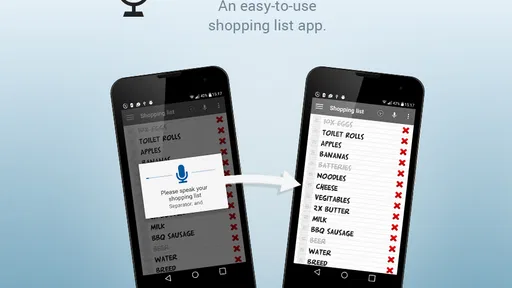
Setting up the app is a breeze. After downloading it from your preferred app store, you’ll be greeted with a straightforward interface. The first thing you’ll notice is the microphone icon prominently displayed. Tap it, and just start talking. The app’s voice recognition is surprisingly accurate, even picking up on slang or different accents, which was a pleasant surprise.
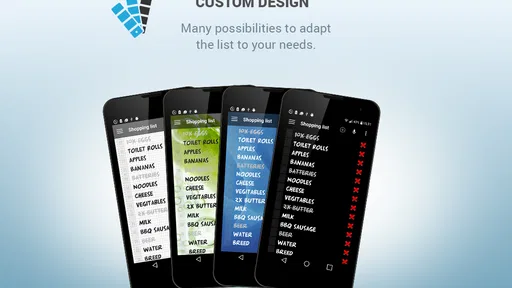
Once you’ve added your items, they appear in a neat, organized list. You can categorize them by type, such as fruits, vegetables, or dairy, which I found helpful for planning out my shopping route in the store.
One useful habit is to say specific versions of an item when that distinction matters to you. “Apples” may be enough for a casual shop, but a variety or size can prevent an avoidable second thought in the produce aisle. I would also scan the list before leaving home: voice capture is good for getting ideas down quickly, while a quick review is where I can catch a misheard word, remove a duplicate, or clarify a quantity. That two-step routine makes a simple tool more dependable without turning list-making into a project.
Heavy-use moments and list upkeep
The app’s value becomes clearer when several people contribute or when a list grows across the week. A shared household list can act as a single place to note what is running low, rather than relying on separate messages that are easy to overlook. Before a trip, I would sort through the entries and remove anything already bought. That small check matters: shared lists reduce the chance of forgotten requests, but they only help if everyone treats the list as current.
For a realistic example, imagine I am making dinner and notice that we are nearly out of rice, then later a housemate asks for coffee. I can capture the first item while cooking and the second can be added by the other person through sharing. On the way to the shop, I can use the categories to work through a familiar route, then edit or delete anything that has changed. The benefit is not a complicated shopping system; it is fewer loose reminders spread across memory, notes, and messages.
Features That Stand Out
What really sets this app apart from traditional list apps is its ability to integrate with other smart devices. For instance, if you have a smart speaker at home, you can sync the app and add items to your list without even picking up your phone. This feature was a game-changer for me, especially when I was in the middle of cleaning or cooking.
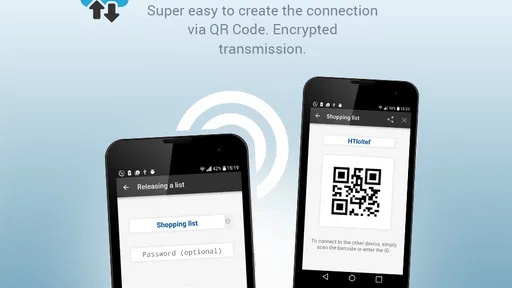
Another cool feature is the sharing capability. You can easily share your list with family members or roommates, so everyone can add what they need. No more double purchases or forgotten items!
"Hey, can you add milk to the list?" - It's that simple!
Compared with a paper list, voice input is faster for capturing an idea when I am occupied, while paper can be more comfortable for someone who wants to see and mark everything without using a phone. Compared with a general notes app, this app’s shopping focus and grocery categories can make a list easier to scan in a store. A notes app may still be the better choice if you already keep recipes, reminders, and household plans together and do not want a separate tool. I would choose this one for quick grocery capture, not as a full meal planner or inventory manager.
Sharing is most useful when people agree on how to use it. If one person adds “milk” and another buys it without checking the list, the app cannot prevent that mismatch by itself. I would ask household members to remove or mark items when they shop, and to be clear about sizes or brands when those details matter. The shared list can coordinate requests, but a little shared discipline is what keeps it accurate.
Keeping Track of Your Needs
The app also provides a nifty history feature, which keeps track of items you frequently purchase. This means you can quickly add those staples like bread and eggs without having to voice them every time. For someone who often forgets the basics, this was a lifesaver.
Additionally, the app allows for easy editing and deletion of items, so if you change your mind or accidentally add something, it’s no problem to adjust your list.
History is especially handy for recurring staples, but I would not assume it can replace a deliberate check of what is actually in the kitchen. A past purchase is a clue, not proof that the item is needed today. My practical routine would be to use history for regular basics, then inspect cupboards and the fridge before adding fresh or occasional ingredients. That keeps the list from becoming an automatic repeat of last week’s basket.
Reliability, device fit, and trade-offs
A voice list has two points where it can go wrong: the spoken item may not be captured as intended, or an old entry may remain after plans change. The editing and deletion options help with the second problem, while checking the list after speaking is a sensible safeguard for the first. I would not rely on voice recognition without a glance when an item is important, unfamiliar, or easy to confuse with another name.
On the device side, Android 6.0 is the minimum requirement, which makes the app a possibility for older compatible phones as well as newer ones. Still, an older device may feel less convenient if opening an app and using its microphone takes longer than writing a note by hand. I would try a few real additions before making it the household’s only list. The key test is whether it feels quick enough in the kitchen and clear enough to check while shopping, not whether voice control sounds impressive in theory.
I also would not choose this app if my main need were a detailed budget, recipe database, pantry tracking, or a shared meal schedule. Its strengths are capturing items, organizing them, and making them available to other people. Someone who wants those broader planning tools may be better served by a more comprehensive grocery or household app, even if it takes longer to set up. The simpler option wins when the problem is simply remembering what to buy.
Final Thoughts
Overall, the Shopping List Voice Input app has made my shopping trips smoother and more efficient. The ability to manage my list hands-free, share with others, and integrate with smart devices has been incredibly convenient. Whether you’re a busy parent, a multitasking cook, or someone who just enjoys the ease of technology, I think you’ll find this app to be a valuable addition to your routine.
My recommendation is strongest for people who often remember groceries while doing something else, and for households that want one shared place for everyday requests. It is less suited to shoppers who prefer paper, avoid speaking to their phone, or need detailed planning features beyond a list. Its approach is deliberately practical: capture the need, organize it, and check it later. If that matches your routine, the app’s straightforward focus is a genuine advantage; if you want a bigger system, a more feature-rich alternative will likely fit better.
Performance verdict
I would judge its speed by the small moments it is meant to improve, rather than expecting a voice list to transform an entire shopping trip. When I can add an item as soon as I think of it, I am less likely to forget it, and the categories and history can reduce some of the fiddling before a shop. The trade-off is that speaking still needs a suitable moment, and a quick review remains part of using the list well. That is a fair balance for a free app whose purpose is focused and easy to understand.
So next time you’re gearing up for a grocery trip, give the Shopping List Voice Input app a try. You might just find that it’s exactly what you’ve been missing in your shopping experience.
Pros
- Quick voice input for easy list creation.
- Hands-free operation while shopping.
- Supports multiple languages.
- Syncs across multiple devices.
- Customizable list categories.
Cons
- Voice recognition errors can occur.
- Requires internet for syncing.
- Limited offline functionality.
- Ads in the free version.
- No price comparison feature.
FAQs for Shopping list voice input
How does the voice input feature work in the Shopping List app?
The voice input feature allows users to add items to their shopping list simply by speaking. This is done using the app's integration with your device's voice recognition technology. Users can say commands like “add milk” or “remove eggs,” and the app will automatically update the list accordingly. This hands-free option is perfect for multitasking or when you're on the go.
Is the Shopping List app compatible with all smartphones?
The Shopping List app is compatible with most Android and iOS devices that support voice recognition. However, it requires a minimum operating system version that supports advanced voice input features. It's advisable to check the specific requirements in the app store to ensure compatibility with your device before downloading.
Does the Shopping List app require an internet connection to use voice input?
While some voice recognition features may work offline, the Shopping List app's voice input feature typically requires an internet connection to function optimally. This is because the app may rely on cloud-based voice processing services to accurately interpret and respond to spoken commands. Check the app settings for offline capabilities.
Can I use the Shopping List app in multiple languages?
Yes, the Shopping List app supports multiple languages for voice input, allowing users to add items in their preferred language. You can change the language settings in the app’s preferences. Make sure your device's language settings match the desired input language to ensure the best performance and accuracy.
Is my personal data secure when using the Shopping List app?
The Shopping List app prioritizes user privacy and data security. Voice inputs are typically processed in compliance with data protection regulations, and personal data is not stored without consent. It's important to review the app’s privacy policy to understand how your information is handled and ensure it meets your privacy standards.


